Tapping plans
Organize the rotation, make the most of your labor and protect tree health.
- Step-by-step wizard: details, rubber tappers and rotation
- Configurable tapping frequency, with rest days
- Automatic suggestion of a balanced rotation
What weighs most on production is the number of tappings actually done. Plan the rotation, track every tapping in the field and see planned vs. actual before the loss turns into damage.
Production lost to missed tappings is silent. Hevea Flow makes that loss visible and fixable.
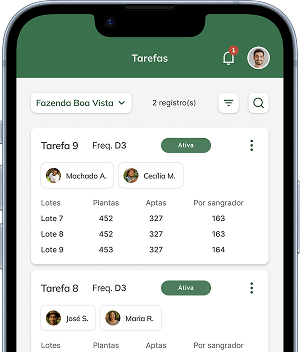
Build tapping plans with the property's frequency. The app suggests a balanced rotation, with the same number of trees per day and nearby tasks grouped together.
From the plans, the app automatically creates the scheduled tappings for each day, for each rubber tapper.
The schedule reaches the rubber tapper app, which records the tapping with time, route and distance by GPS, even without internet.
A recorded tapping stays pending until you check it. Nothing counts as done without your confirmation.
Track planned vs. actual, delayed and lost tappings and each rubber tapper's frequency, in time to act within the month.
Frequency shows whether the team is keeping to the calendar and which rubber tappers are missing the most. The app calculates it for you, per rubber tapper and for the property.
Example: 100 scheduled tappings, 10 excused due to rain. The rubber tapper did 85 of the remaining 90.
Every module feeds the indicators automatically, with no spreadsheets.
Organize the rotation, make the most of your labor and protect tree health.
Track every tapping in the field, with planned vs. actual.
Be sure the tapping happened, with evidence from the field.
Ensure regular stimulant applications at the right dosage.
Relate rainfall to production and make better decisions.
Organize the operation in cycles, with goals and results tracking.
Frequency = (completed + recovered tappings) ÷ valid tappings × 100. Valid tappings are the scheduled ones minus excused and canceled ones. Example: out of 100 scheduled tappings, 10 were excused due to rain; the rubber tapper did 85 of the remaining 90, so their frequency is 94.4%.
No. The app suggests a rotation that spreads the trees evenly across the days and groups nearby tasks. You can move tasks and rows between days and mark rest days.
Record the rain in the app and mark the day's tappings as excused. Excused tappings don't count against the rubber tapper's frequency.
No. The rubber tapper app works without signal, maps included, and sends the records as soon as the connection comes back.
Create your account and start using Hevea Flow Producer, or book a demo with our team and get your questions answered live.